Reviews Electronics Smart Home
Echo Show or Nest Hub? We compared 9 smart displays and these 4 are worth it
Smart displays for kitchens, bedrooms and family hubs from Amazon and Google, chosen for their ecosystems, privacy features and value.
 BuyWithVoltTop Pick2026
Photo: Japanwikisan / Wikimedia Commons, CC BY 4.0
A smart display is a speaker with a screen, and that screen changes a lot. You can follow a recipe hands-free, see who's at the door, glance at the weather and check the family calendar without picking up a phone. The tricky part is choosing the right ecosystem and size before you fill your home with them.
We compared nine smart displays from Amazon and Google. We researched features and privacy controls, read independent reviews and owner feedback, and looked at how well each one works with popular smart home gear. Four displays cover the most common rooms and needs, from a tiny alarm clock to a wall-mounted family hub.
Our top picks
-
Best smart display overall
Amazon Echo Show 8 (3rd Gen)
$149 at AmazonJump to details -
Best for Google users
Google Nest Hub (2nd Gen)
$99 at TargetJump to details -
Best for a nightstand
Amazon Echo Show 5 (3rd Gen)
$89 at AmazonJump to details -
Best for families
Amazon Echo Show 15
$279 at AmazonJump to details
Prices at time of writing and may change. We may earn a commission when you buy through these links.
Best smart display overall
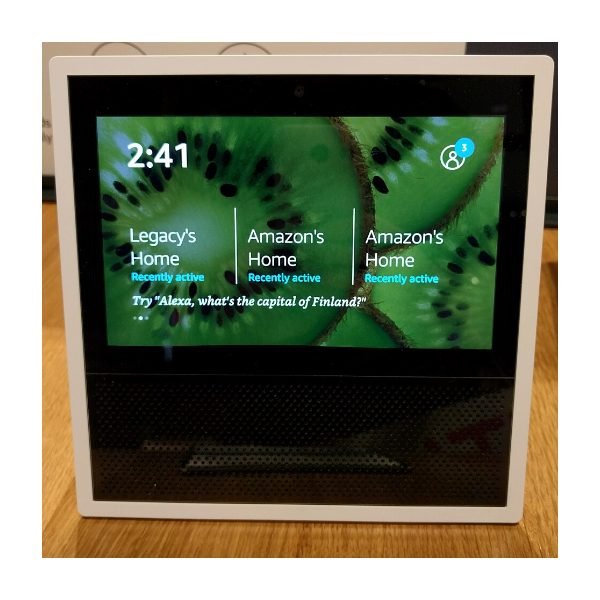
Photo: Daylen / Wikimedia Commons, CC BY 4.0
The Echo Show 8 hits the sweet spot between size and price. Its 8-inch screen is large enough to read recipes and watch a show from across the kitchen, and reviewers praise its fuller sound compared with smaller displays. It also has a built-in smart home hub that supports Zigbee and Matter, so it can control many lights and plugs directly. The camera works for video calls and has a physical shutter, plus a button that turns off the mics. The downside is that Amazon pushes ads and suggestions onto the home screen, which some owners find cluttered. It's still the most well-rounded display for most homes.
Pros
- Good size for kitchens
- Fuller sound than smaller displays
- Built-in smart home hub
Cons
- Ads and promos on the home screen
- Best with Amazon services
Specs
| Screen | 8-inch touchscreen |
|---|---|
| Assistant | Alexa |
| Camera | Yes, with physical shutter |
| Smart home | Zigbee and Matter hub |
Best for Google users
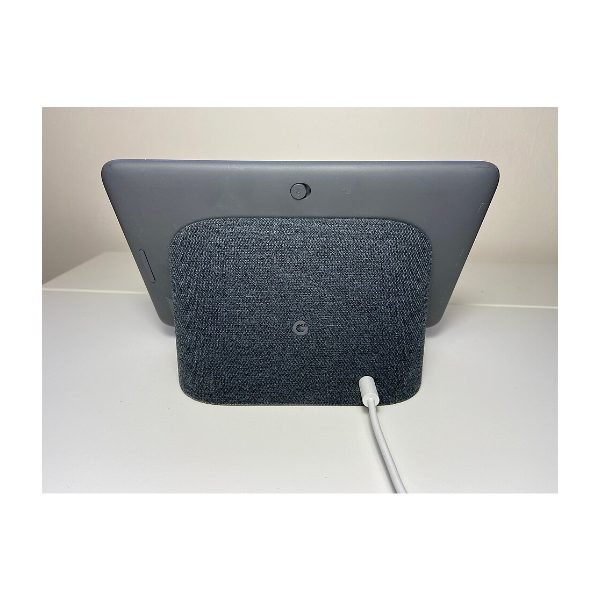
Photo: Graceoftheshire / Wikimedia Commons, CC BY-SA 4.0
If your family runs on Google Calendar, Gmail and Google Photos, the Nest Hub (2nd Gen) is the natural pick. Its 7-inch screen turns into a lovely digital photo frame, and Google Assistant is quick with general questions. There's no camera at all, which makes it a privacy-friendly choice for bedrooms. It also offers optional sleep sensing that uses radar to track sleep without a wearable. Speaker quality is fine for podcasts and timers, though weak for music. Google has slowed down updates for its older smart displays, so this is a better buy for simple needs than for the most advanced smart home setups.
Pros
- No camera, good for privacy
- Excellent photo frame
- Works well with Google services
Cons
- Weak music sound
- Fewer new features from Google lately
Specs
| Screen | 7-inch touchscreen |
|---|---|
| Assistant | Google Assistant |
| Camera | None |
| Extras | Optional sleep sensing |
Best for a nightstand
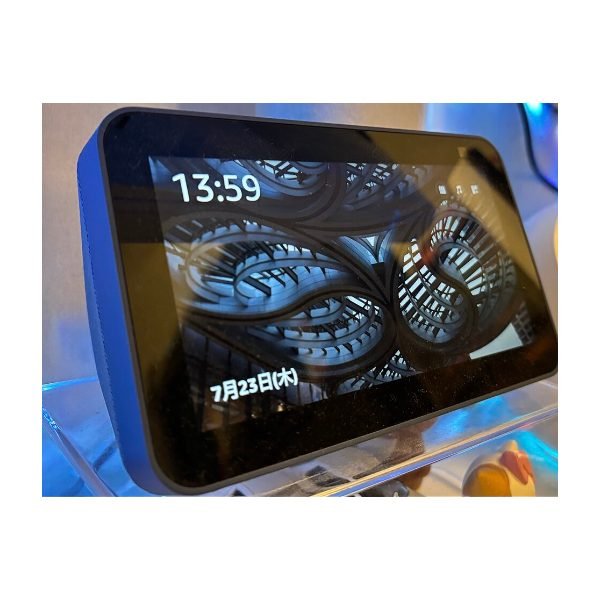
Photo: Japanwikisan / Wikimedia Commons, CC BY 4.0
The Echo Show 5 is about the size of an alarm clock, and that's exactly how most owners use it. The 5.5-inch screen shows the time, weather and your next alarm, and it can dim automatically at night. You can tap the top to snooze, and a sunrise alarm gradually brightens the screen. It's also a cheap way to add Alexa controls and a small camera for video calls to a bedroom or home office. Sound is thin for music, and the small screen is cramped for recipes or video. For bedside use, though, it's one of the best values in smart home gear and often sells for less.
Pros
- Low price
- Great as a smart alarm clock
- Small footprint
Cons
- Small screen for video
- Thin sound
Specs
| Screen | 5.5-inch touchscreen |
|---|---|
| Assistant | Alexa |
| Camera | Yes, with physical shutter |
| Best for | Bedrooms and desks |
Best for families

The Echo Show 15 is designed to hang on a wall like a picture frame, and it shines as a family command center. Its 15.6-inch screen shows shared calendars, sticky notes, shopping lists and smart home controls in one glance. It also runs Fire TV, so you can stream shows in the kitchen. Visual ID can recognize different family members and show personalized reminders. Mounting it takes some planning since it needs nearby power, and audio is modest for a screen this size. It's overkill for one person, but for busy households it replaces a paper calendar and fridge whiteboard neatly.
Pros
- Large, wall-mountable screen
- Excellent family organizer
- Fire TV built in
Cons
- Expensive
- Audio doesn't match the screen size
Specs
| Screen | 15.6-inch touchscreen |
|---|---|
| Assistant | Alexa |
| Mounting | Wall or optional stand |
| Streaming | Fire TV built in |
How we chose
We compared nine current smart displays from Amazon and Google, which make nearly all of the mainstream models sold in the US. We researched screen sizes, speakers, cameras and privacy controls, then read independent reviews and owner feedback for issues like ads, slowdowns and dropped smart home connections. We also considered how long each company has supported its displays with updates, and checked price history since these devices go on sale often.
What to look for when buying a smart display
- Pick an ecosystem first: Amazon displays work best with Alexa and Ring. Google displays pair with Google Home and Nest. Mixing both gets messy.
- Room and size: 5 to 7 inches suits nightstands and desks. 8 inches and up works better in kitchens.
- Privacy: Look for a physical camera shutter and a mic-off button, or choose a camera-free model for bedrooms.
- Network security: Every connected device is another way into your network. Our guide on how to secure your home Wi-Fi covers the basics.
If you mostly want music, a dedicated speaker sounds better. See our picks for the best Bluetooth speakers. And for a big-screen setup, our streaming device picks pair well with any TV.
Frequently asked questions
Do smart displays always listen to me?
They listen locally for a wake word, then send what you say to the cloud. All of these have a mic-off button, and you can review and delete voice history in the Alexa or Google Home app.
Can a smart display replace a smart home hub?
Some can. The Echo Show 8 includes a Zigbee and Matter hub. Others rely on Wi-Fi devices or a separate hub.
Do I need a subscription?
No. Basic features work without one. Some services, like video doorbell history or premium music, need separate subscriptions.